Wix lead conversion tracking: measure the whole journey
Understand Wix lead conversion tracking with clear formulas, a sample funnel, reporting definitions and a practical weekly review checklist.
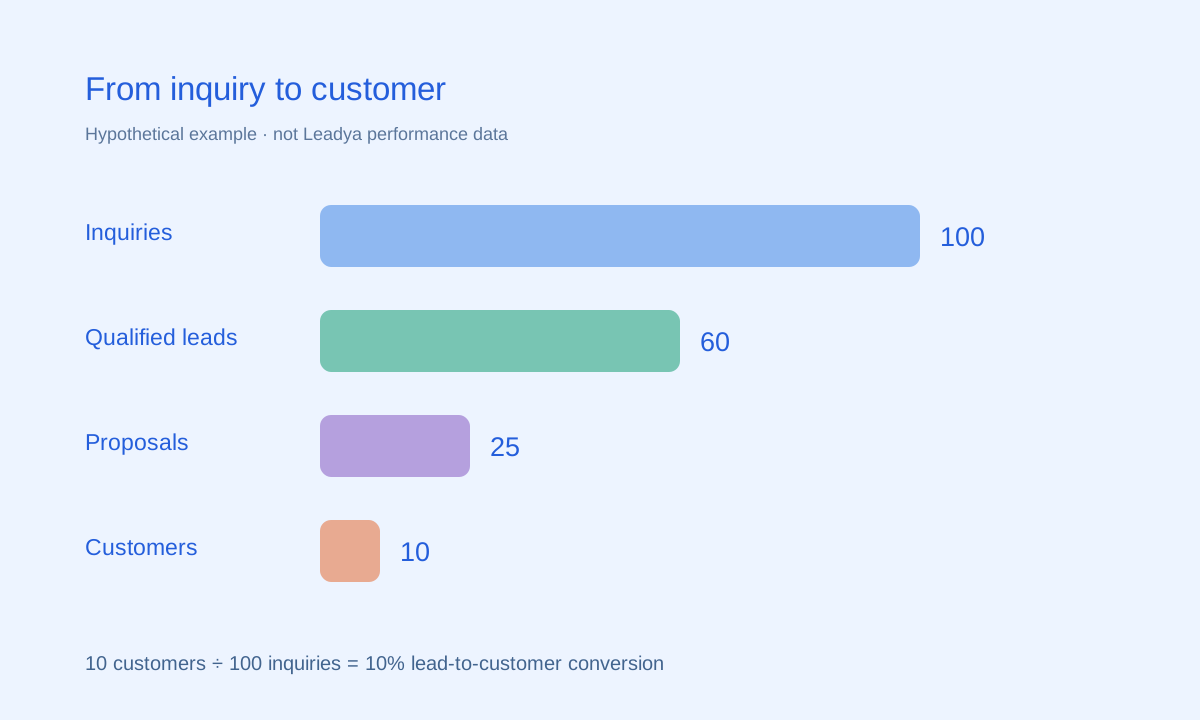
Hypothetical example, not actual customer results.
Define the numbers before building a report
A high submission count can look promising while saying little about sales. To understand the journey, distinguish the visitor, the inquiry, the qualified opportunity and the customer. Each answers a different question.
A form conversion rate helps you understand whether visitors take the action offered on the page. A qualification rate helps you understand whether the inquiries fit your service. A lead-to-customer rate helps you understand what happens after capture. None of these measures is a complete diagnosis on its own.
Leadya’s feature descriptions include reports, analysis and lead export. Review the reporting features and verify the fields and definitions available in your account. If a metric is not provided directly, use an appropriate export or reporting process rather than assuming it is tracked automatically.
Use clearly defined conversion formulas
| Metric | Formula | Interpretation |
|---|---|---|
| Form conversion rate | Form submissions ÷ relevant visits × 100 | How often visits to the form’s page produce a submission. |
| Qualification rate | Qualified leads ÷ total leads × 100 | How often inquiries meet your agreed criteria. |
| Lead-to-customer rate | Customers ÷ leads in the same cohort × 100 | How often a defined group of leads becomes customers. |
| Proposal win rate | Accepted proposals ÷ decided proposals × 100 | How often decided proposals are accepted. |
| Time to first response | First substantive response time minus inquiry time | How long the visitor waits for a useful reply. |
Choose the denominator carefully. All website visits are not necessarily relevant to a form on one landing page. Likewise, counting submissions instead of unique inquiries can overstate demand when the same person submits more than once. State whether you are counting submissions, unique contacts or opportunities.
Do not divide this month’s customers by this month’s leads and assume they belong together. Some customers may have inquired earlier. Cohort reporting follows leads that entered during a defined period and observes their outcomes over an appropriate window.
Read a funnel without confusing examples with evidence
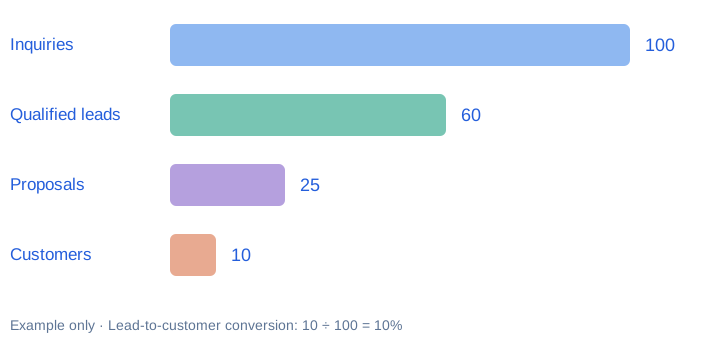
In this made-up example, 100 inquiries produce 60 qualified leads, 25 proposals and 10 customers. The qualification rate is 60%, while the lead-to-customer rate is 10%. These numbers show how the arithmetic works; they are not a benchmark, a prediction or a Leadya customer result.
The same funnel shape can have different causes. Fewer proposals may reflect good qualification, limited capacity or a weak handoff. Read the records and speak with the team before deciding what to change.
A chart should make the underlying question clearer. If the chart cannot explain which leads are included, when they entered and what each stage means, simplify the report before drawing conclusions.
Keep source and inquiry context together
Where supported by your form, analytics and reporting setup, distinguish the page or campaign that generated an inquiry. Useful context might include the service page, the form used or a campaign label. Verify that the information is captured consistently rather than assuming attribution is available.
Campaign parameters can be lost or altered across navigation and third-party tools. Treat source reports according to the measurement setup you have actually tested. Avoid claiming that every customer can be attributed perfectly to a single visit.
Combine quantitative reports with the inquiry itself. If a campaign produces many poor-fit requests, compare its promise with the form’s wording and fields. If good inquiries stall after submission, review the lead follow-up process.
Make one useful decision from each review
- Check data quality. Identify test submissions, duplicates and missing information according to your reporting rules.
- Review a consistent cohort. Record the entry period and allow enough time for the normal sales cycle.
- Inspect the handoff. Look at open inquiries and their next actions, not just totals.
- Choose a focused change. Improve one relevant page, form question or follow-up step at a time.
- Record the result. Compare like-for-like periods and document changes that could affect interpretation.
A change in conversion does not prove that a design change caused it. Traffic mix, seasonality, sample size and sales capacity can all affect results. Where volumes are small, review individual inquiries as well as the percentages.
If your reports reveal a gap between capture and follow-up, return to the Wix lead system selection guide. The goal is a process your team can act on, not a larger collection of charts.
Common questions
What is a good conversion rate for a Wix lead form?
There is no universal target. Results depend on the offer, traffic, audience, form purpose and how conversion is defined. Establish a reliable baseline for your own workflow before setting a target.
Is a form submission the same as a customer conversion?
No. A submission records an inquiry or another form action. A customer conversion is a later business outcome. Track them separately with clear definitions.
Can I calculate conversion from exported leads?
You can calculate metrics when the export contains the necessary, reliable fields and outcomes. Confirm the available fields, define the cohort and avoid combining incompatible datasets.
Sources & scope
Product descriptions refer to Leadya’s feature and setup information. Workflow recommendations and examples are editorial guidance; verify current capabilities and plan details for your own account.